Dynamic URL variables put each screen’s own details into a web address. Write a variable such as {player.id} or {player.tags.store} in the URL, and every screen replaces it with its own value when it loads the page. Use them to send screen details to APIs, content feeds, analytics or your own dashboards, so one playlist can show different content on each screen.
Note: Variables work in the Website app and the other apps that load a web page from a URL.
Available Variables
| Variable | Value |
|---|---|
{player.id} | The screen’s player ID |
{player.name} | The screen’s name |
{player.serial} | The device serial number, if the device reports one |
{player.manufacturer} | The device manufacturer, if the device reports it |
{player.osPlatform} | The device operating system, if the device reports it |
{player.tags.key} | The value of the tag key:value on the screen, for example {player.tags.store} |
{player.tags.all} | All the screen’s tags, separated by commas |
- Values are URL-encoded automatically.
- If a screen has no value for a variable, it is replaced with nothing. To use a fallback instead, add it after a
|:{player.tags.store|default}. - Tag names are case-sensitive.
Using Tags
Add tags to a screen in the form key:value. See Screens. For example:
store:AU-001
zone:MenuBoard
city:Sydney
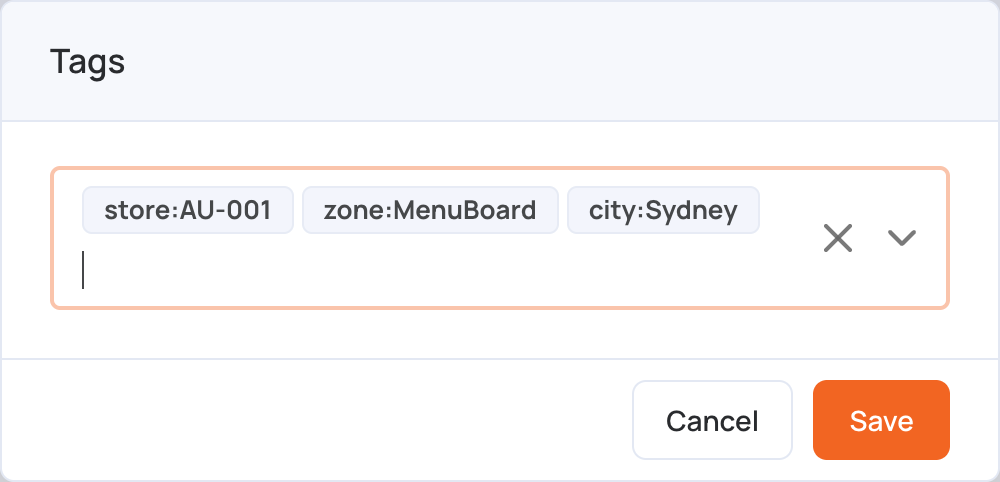
| Variable | Becomes |
|---|---|
{player.tags.store} | AU-001 |
{player.tags.zone} | MenuBoard |
{player.tags.city} | Sydney |
{player.tags.all} | store:AU-001,zone:MenuBoard,city:Sydney |
Only tags written as key:value can be used by name. A tag without a colon, such as lobby, is only included in {player.tags.all}.
Examples
Send the player ID and the store:
https://example.com/sync?player={player.id}&store={player.tags.store}
Use tags in the path:
https://example.com/{player.tags.store}/{player.tags.zone}
Send all tags:
https://example.com?tags={player.tags.all}
Best Practices
- Use short, lowercase tag names, such as
store,zoneorchannel. - Avoid spaces in tag values: use
-or_instead. - Give important variables a fallback with
|, so the URL still works on screens without that tag.